
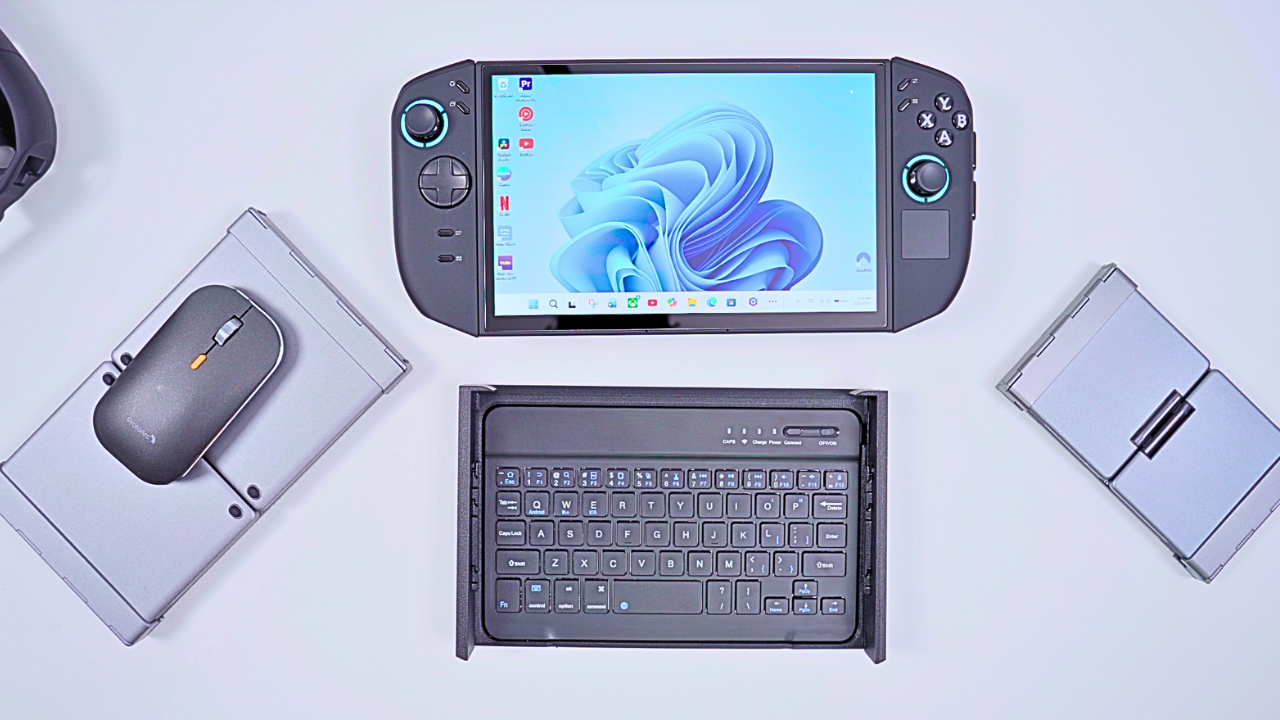
Can a Handheld Gaming PC Replace My Other Devices?
After buying the Legion Go 2, I made a decision that felt a little extreme at first — I put my other devices away. For the next month, I used the Go 2 at home, on the go, and in everyday situations to see if it could realistically become my main computer. What started as a simple test quickly turned into a deeper look at how I actually use technology day to day, and where a handheld gaming PC fits into that mix. Watch my Youtube video here https://youtu.be/8fqYQNZmVJc
One of the biggest advantages of the Legion Go 2 is its detachable controllers. That flexibility allows it to adapt to situations where other handhelds feel awkward or limited. Whether I was gaming, watching content, or doing quick productivity tasks, the form factor often worked better than I expected. That said, there was one software frustration I kept running into — streaming apps inside Xbox fullscreen mode. While the interface is clearly designed for gaming first, not being able to install common video apps without switching to desktop mode felt like an unnecessary extra step. It’s not a deal breaker, but it’s something I’d love to see improved.
Audio That Travels With You
For the last couple of weeks of testing, I paired the Legion Go 2 with SteelSeries Arctis earbuds. The transparent design caught my eye immediately, and the orange color sealed the deal. Most of the time I used them with the USB-C dongle, though Bluetooth worked just as easily. The companion app made it simple to switch between game profiles or fine-tune custom EQ settings.
Sound quality was excellent, especially in games where positional audio matters. While they’re designed with gaming in mind, I also used them with my iPhone after adjusting the EQ. I did notice a faint hiss when noise control was enabled in quiet moments, but it was never distracting once media was playing. Overall, they became a regular part of my daily setup.
Battery Life in Real Use
To stretch battery life, I ran the Legion Go 2 in balanced thermal mode, smart fan settings, and efficiency power mode. I mixed lighter titles like Megabunk and Abselum with heavier games such as Doom: The Dark Ages — and it handled everything without issue.
On one commute, I started at around 89% battery at 9:30 a.m. and arrived at my destination just after 11:30 with about 59% remaining. That included time spent switching keyboards and adjusting camera gear. For real-world mixed use, the results were better than I expected.
Turning the Legion Go 2 Into a Portable Workstation
The 8.8-inch screen proved surprisingly usable for quick productivity — updating scripts, checking email, browsing stats, and handling small tasks. When I needed internet access, my phone’s hotspot worked perfectly.
To make the Legion Go 2 feel like a true portable computer, I experimented with several keyboard setups. The first was a 3D-printed laptop-style case that connected via Bluetooth and charged over USB-C. It required removing the controllers and didn’t include a trackpad, so navigation relied on the touchscreen or an external mouse. The smaller keys took some getting used to, but for maximum portability, it worked.
The second 3D-printed case snapped onto the main body without removing controllers and allowed use of the kickstand. It paired with a Bluetooth keyboard that included a trackpad and RGB lighting. While the typing experience was similar to the first case, I appreciated being able to keep the controllers attached. The detachable magnetic keyboard was a smart touch, though the magnets weren’t particularly strong.
For pure portability, the iClever folding keyboard was the smallest solution. It included a trackpad with physical click buttons and could connect to multiple devices. The compact layout occasionally caused mistyped keys, but it was incredibly easy to carry.
My favorite setup ended up being the ProtoArc folding keyboard and mouse combo. It was larger and less travel-friendly, but by far the most comfortable. The full-size layout and proper mouse made it feel like a real desktop replacement. Best of all, it required no changes to the Legion Go 2 itself — just unfold and work.
Protecting a Portable Powerhouse
Once I started using the Legion Go 2 outside, protection became a priority. I added Lenovo’s tempered glass screen protector, which went on cleanly and was barely noticeable. For the rest of the device, a silicone case provided grip, cutout access, kickstand compatibility, and light impact protection. While it didn’t completely eliminate the fear of dropping the device, it made daily handling feel safer and more comfortable.
Can It Replace a Desktop Editing Setup?
To truly test whether the Legion Go 2 could serve as my main computer, I attempted to edit this very project on it. Using a Thunderbolt dock, I connected dual monitors, external storage, and audio gear — all through a single cable that also charged the device.
For lighter creative tasks, performance was great. But once I pushed into full Adobe Premiere Pro timelines with layered footage, graphics, and voiceover, things became inconsistent. The fan ramped up often, playback stuttered, and eventually I moved back to my Mac Mini to finish the project. For everyday productivity, the Legion Go 2 works like a standard PC. For heavier video editing, it’s capable — but not ideal.
Wireless Transfers and Daily Convenience
I also tested Microsoft’s Phone Link app to move photos and short videos from my iPhone directly to the Legion Go 2. It allowed me to read and reply to texts, manage notifications, and send files across platforms. While it worked, it wasn’t nearly as fast or seamless as AirDrop between Apple devices. For quick photos it’s fine — for large video files, I’d stick to other methods.
From Desk to Couch to Bed
One of the most satisfying parts of using the Legion Go 2 as a desktop replacement is how easily it transitions back into a gaming device. Switching back to Xbox fullscreen mode instantly brings your entire library forward. Lenovo’s controller adapter turns the detached controllers into a surprisingly comfortable standalone gamepad, with improved ergonomics and built-in charging.
I also tested a third-party Gamester controller, which felt great in hand and offered extensive customization through software. Most games worked perfectly — though Call of Duty once again proved stubborn with controller compatibility. Eventually it worked, but not without extra tinkering.
When I wanted to move out of the office, a compact JSAUX dock let me connect the Legion Go 2 to TVs around the house. With USB ports, Ethernet, and support for up to 4K at 120Hz, it made shifting rooms effortless — even if my current TV doesn’t fully take advantage of those specs.
Final Thoughts After a Month of Use
Being able to move my entire game library from my desk to my bedroom, my couch, or even outdoors reinforced just how versatile the Legion Go 2 really is. It’s not as powerful as a dedicated console, and after a month of daily use, it’s not a perfect tablet, laptop, or desktop either. But it performs well enough in each of those roles that I’d feel comfortable relying on it when needed.
And at the end of the day, being able to simply lay back and play my favorite games — without switching devices — is what makes living with a handheld gaming PC so enjoyable.