
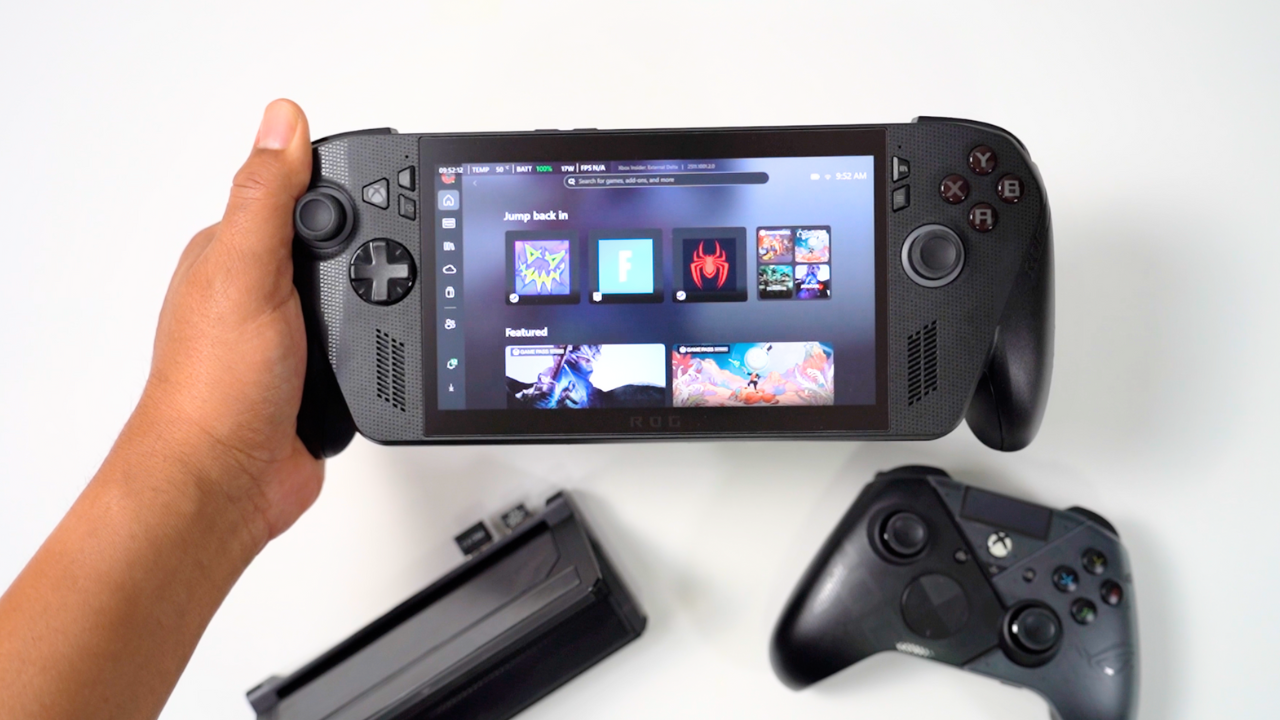
First Impressions and Early Concerns
When I pre-ordered the Xbox ROG Ally X, I really wondered if it was going to be worth the upgrade—especially since I still enjoy using my original Ally. After spending a couple of weeks with it, I’ve learned a lot about what this device actually is. It left me a little disappointed, but also excited about the future. You can watch my Youtube video about it here:https://youtu.be/cU5OABnXC4k
I’m always worried about scratching my screens, so one of the first things I did was apply a screen protector. Even though this isn’t the most expensive handheld I’ve bought this year (that honor goes to the Legion Go 2), I still didn’t want to risk scratching a thousand-dollar device. The protector was made for the original Ally X, but since both models use the same 7-inch screen, it fit perfectly—even around the rounded corners. I’ll come back to that screen later because I have some strong opinions about ASUS’s decision to keep it the same.
Upgrading to a 4 TB SSD
The first major upgrade I did was swap out the original 1 TB SSD for a 4 TB drive. ASUS claims the process is easy—and mostly, it is—but one part caught me off guard. I followed the official ASUS ROG guide exactly, using a number-zero Phillips head.
There are five screws on the back plate and three on the bottom. The top-middle screw is captive, so it just loosens but doesn’t come out. I used a pry tool and guitar-pick-style tool to open the back, being careful not to pull the ribbon cable.
The hardest part? Disconnecting the battery. The black tab wouldn’t move, so I gently used small pliers to lift it just enough to loosen it. That single step took the longest.
I replaced the drive with a WD Black SN7100 (non-X variant) from Amazon—cheaper but fully compatible. After reattaching the battery and screws, I entered the BIOS by holding power + volume down and used ASUS Cloud Recovery, which they recommend over cloning. It took hours (Ethernet helped when Wi-Fi failed), but it worked flawlessly.
Once Windows reinstalled, I updated drivers and Armory Crate. Between all that and downloading my games, my first day was gone—but now I’ve got 4 TB of blazing-fast storage.
Testing the Xbox Full Screen Experience
I was genuinely excited for Microsoft’s new Xbox Full Screen Experience, but it’s not quite what I expected.
The home screen starts strong with “Jump Back In,” showing recently played titles. But below that are “Featured,” “Discovered Handheld Optimized,” and “Recently Added to Game Pass,” all stacked with banners, ads, and prices. It feels more like a storefront than a gaming dashboard—like it’s built to sell games before letting me play the ones I own.
By contrast, the Steam Deck interface feels clean and player-focused: large artwork, minimal text, and your library front and center. I wish Microsoft took notes from that.
Controls, Navigation, and Sleep Mode
Navigating the Xbox interface feels natural. The left stick and D-pad handle everything; A selects, B goes back. Clicking into a search bar brings up the on-screen keyboard, which I can move through with the D-pad. Tapping the Xbox button brings up controls, while holding it opens different menus or desktop mode.
ASUS kept the Armory Crate button, which gives quick access to power profiles and GPU VRAM allocation. Launching games mostly works well, though some inconsistencies remain (for example, Streets of Rage triggers the on-screen keyboard randomly).
Sleep mode also varies. Ninja Gaiden 4 resumed perfectly, losing only 1 % battery after 30 minutes. Madden, however, dumped me back to SteamOS when I woke it. Still, I never needed desktop mode all week—which is real progress.
Design and Ergonomics
I’ll admit: when ASUS first revealed the Xbox Ally X, I thought it looked awkward. The grips seemed bulky and bolted on. But once I held it, I completely changed my mind. It’s one of the most comfortable handhelds I’ve used—comparable to the PlayStation Portal.
The joysticks feel balanced and accurate. The triggers, face buttons, and D-pad all feel crisp without being noisy. Even though the new grips don’t fit my old case, they still slide into my everyday sling.
The speakers blew me away. Out of all my handhelds, the Xbox ROG Ally X has the best speakers—loud, clear, full of bass, and distortion-free at high volume.
Performance and Benchmarks
The biggest letdown is the screen. It’s still the same 7-inch panel from the original Ally X—and at $1,000, I really expected at least an 8-inch or OLED display.
Still, performance is noticeably better thanks to the new Z2 Extreme processor. I tested both the new and old Ally X at 17 W and 25 W using 900p / 60 Hz, low-graphics presets, and 8 GB VRAM dedicated to the GPU.
📊 Benchmark Results
| Game / Test | Power Mode | New ROG Xbox Ally X (Z2 Extreme) | Old ROG Ally X (Z1 Extreme) |
|---|---|---|---|
| Marvel Rivals | 17 W | 40 FPS | 34 FPS |
| 25 W | 51 FPS | 41 FPS | |
| Doom Dark Ages | 17 W | 60 FPS | 36 FPS |
| 25 W | 62 FPS | 41 FPS | |
| Black Myth Wukong | 17 W | 69 FPS | 52 FPS |
| 25 W | 92 FPS | 66 FPS | |
| Cyberpunk 2077 | 17 W | 85 FPS | 64 FPS |
| 25 W | 117 FPS | 94 FPS | |
| 3DMark Time Spy | 17 W | 3,505 | 2,968 |
| 25 W | 3,889 | 3,259 | |
| 3DMark Fire Strike | 17 W | 8,123 | 6,788 |
| 25 W | 8,760 | 7,435 |
Across every game and benchmark, the new Ally X pulled ahead. What really surprised me was that the 17 W mode nearly matched the original’s 25 W performance—proving the Z2 Extreme’s efficiency.
For my battery test in Call of Duty Black Ops (1080p / 60 Hz):
- 25 W mode: 100 % → 80 % after 30 minutes
- 17 W mode: 100 % → 87 % after 30 minutes
That translates to roughly 2 hours 30 minutes at 25 W or 3 hours 30 minutes at 17 W under similar conditions.
Final Thoughts: Great Evolution, Not a Revolution
After a couple of weeks, I’ve come to really enjoy the Xbox ROG Ally X. But if I didn’t make YouTube videos, I probably wouldn’t have bought it. My original Ally X still plays the same games well enough, and with a few tweaks—like installing Xbox Full Screen Mode and adding grips—it delivers 90 % of the same experience.
The reused display makes this upgrade feel less exciting, but the ergonomics, efficiency, and audio quality do make it a step forward.
At the time of writing, the original Ally X sells for $899, while the Xbox Ally X costs $999. For $100 more, you get the upgraded CPU, better sound, and improved comfort. If you’re new to handheld gaming, it’s worth it. If you already have the original Ally X, you might want to wait for the next version—hopefully with OLED or a bigger display.
ASUS and Microsoft are clearly building something special here. It’s not perfect yet—but it’s a handheld I genuinely enjoy using, and I’m excited to see where it goes next.
References
ASUS. (2025, October 15). How to upgrade the SSD and reinstall Windows on your ROG Ally, ROG Xbox Ally, or ROG Xbox Ally X. ROG Guides. https://rog.asus.com/articles/guides/how-to-upgrade-the-ssd-and-reinstall-windows-on-your-rog-ally/?utm_source=chatgpt.com
ASUS. (2025). 2025 ROG Xbox Ally X (RC73XA) – Support (BIOS). ROG USA. https://rog.asus.com/us/gaming-handhelds/rog-ally/rog-xbox-ally-x-2025/helpdesk_bios/