
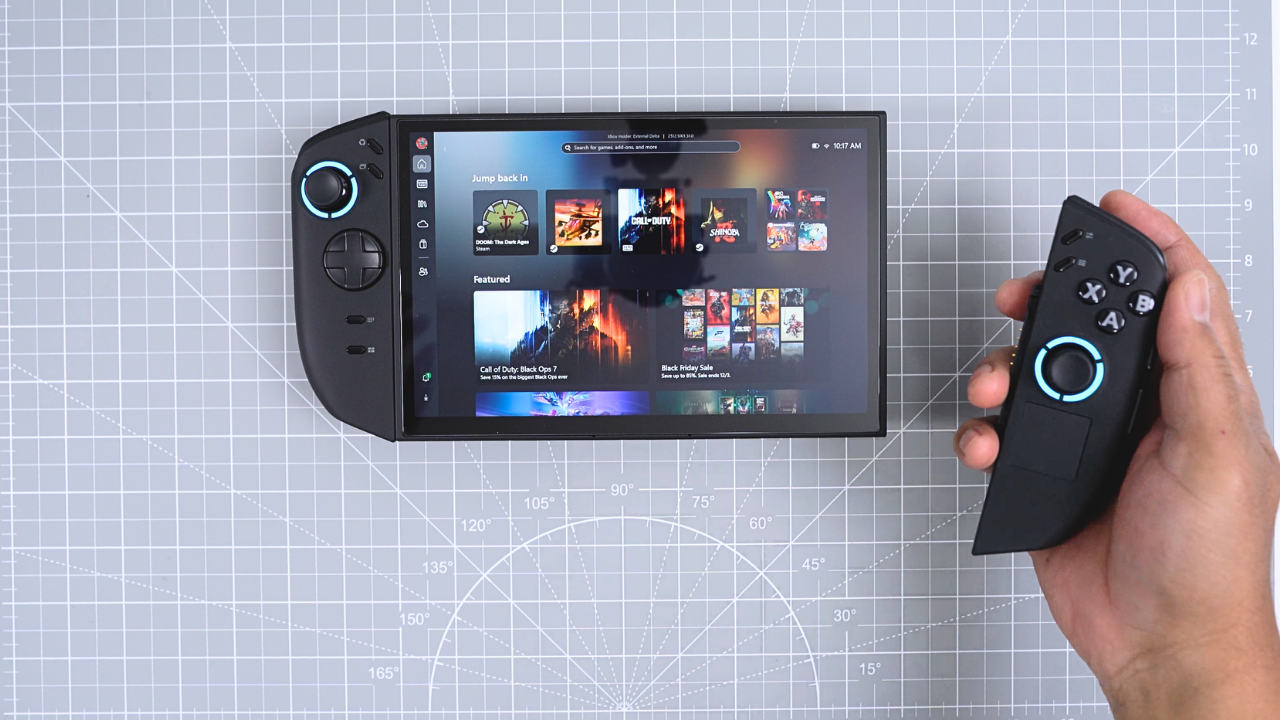
When Lenovo announced the price of the Legion Go 2, my initial reaction was disbelief. It felt aggressive for a market that’s already crowded with powerful handheld PCs. But after several weeks of daily use—not just testing on a desk, but actually living with the device—I’ve come to understand what Lenovo was trying to accomplish.
Whether or not you agree with the pricing, one thing is clear: this isn’t a simple refresh. The Legion Go 2 feels like Lenovo’s attempt to transform the Legion Go from an experimental first-generation product into something polished, premium, and complete. Here is my video review on Youtube:https://youtu.be/PNFFSiGr32U
A Carrying Case That Actually Matters
Usually, accessories included in the box barely deserve a mention. This time, the carrying case surprised me. It’s padded, lined with soft fabric, and feels intentionally designed rather than tossed in. It protects the screen well without adding bulk, and that’s rare.
For once, I didn’t feel the urge to immediately buy a replacement. It slides easily into a sling bag and feels like it belongs with the hardware rather than being a disposable extra.
Screen Protection and Display: OLED Changes Everything
One of the first things I did was install a screen protector. Despite both models having 8.8-inch displays, the original Legion Go’s protector doesn’t fit—the panel shape is slightly different this time.
Lenovo’s official HD clear protector installs cleanly and becomes almost invisible once applied. But protection aside, the real story is the OLED display.
This screen is immediately striking. Blacks are deeper, colors are richer, and highlights look far better than anything on the original LCD model. Whether I was playing shooters or more cinematic games, everything looked sharper and more dynamic. The OLED panel is, without question, one of the Legion Go 2’s strongest upgrades.
Storage Upgrades Come with a Surprise
Thanks to the removable controllers, opening the Legion Go 2 is easier and safer than most handhelds. You can lay it flat without pressing on triggers or analog sticks while doing surgery on the inside.
Removing the backplate requires eight screws. From there, upgrading storage becomes a layered process:
- Disconnecting and removing the battery
- Removing the fan
- Removing a plate hiding the SSD
None of it is difficult, but it’s more involved than the original model.
What surprised me is that Lenovo shipped the Legion Go 2 with an M.2 2242 SSD instead of a full-length 2280. For the price, I expected something larger by default. It didn’t change my upgrade plans, but it still felt like an odd choice in a premium-tier product.
Restoring Windows the Official Way
Rather than cloning the drive, I used Lenovo’s recovery tool to perform a clean install of Windows. After entering the device’s serial number and signing in, Lenovo’s software creates a recovery USB and handles nearly everything automatically once plugged in.
It works well—but it’s slow.
If you want a clean experience, it’s a good method. If you don’t care about fresh installs, cloning is still faster and easier.
Fingerprint Login and Proper Display Orientation
Two quality-of-life upgrades stood out right away.
Fingerprint Reader
The power button now includes a fingerprint sensor, and it’s excellent. Logging in becomes instant and frictionless—no PIN codes, no typing.
Native Landscape Display
The original Legion Go used a portrait-oriented panel, which caused awkward behavior during setup and in Windows. The Legion Go 2 finally uses a true landscape display. Setup is smoother, rotation issues are gone, and everything just feels more natural.
Xbox Full-Screen Mode Transforms Windows
Once you experience Xbox Full-Screen Mode, it’s hard to tolerate Windows in its default form on a handheld again. Navigation becomes simpler. Apps feel console-friendly. The entire UI becomes controller-first.
Microsoft has since announced wider support for this mode on all handheld devices, so the setup process may be easier for future users than it was for me. But once enabled, it dramatically improves day-to-day usability.
Audio and Ergonomics Improvements
The speakers are still rated at two watts, but they sound significantly better. The original Legion Go’s audio always felt thin and sharp. The Legion Go 2 offers fuller sound with more presence and less harshness.
Ergonomics are better, too. Lenovo abandoned the squared-off grips and replaced them with rounded contours that sit more naturally in the hand. The buttons and triggers feel familiar, but the comfort during long sessions is noticeably improved.
FPS mode also gets attention. Lenovo added a rail cover and locking mechanism so you’re no longer resting your hand on exposed connectors when the controller is detached. These are small design changes—but they make FPS mode feel properly finished.
Battery Life and Weight Balance
The Legion Go 2 uses a considerably larger battery than its predecessor, jumping from 49 Wh to 74 Wh.
In real-world gameplay:
- Thirty minutes of multiplayer gaming left over 70% battery remaining
- Estimated total playtime stretched well beyond the original
Charging is respectable. A thirty-minute charge from nearly empty brought the battery to around 40% using the included charger.
The tradeoff is weight: the Legion Go 2 is heavier than its predecessor. But in practice, most play sessions are supported by a lap, table, or armrest. The increased battery life is far more noticeable than the extra grams.
Performance & Benchmarks: Closer Than Expected
I fully expected the Legion Go 2 to dominate performance testing.
It didn’t.
Instead, what I found was consistency improvements rather than total domination. For testing, both devices were set to:
- 800p resolution
- 60 Hz refresh rate
- VRAM fixed at 6 GB
Each game was tested in Balanced and Performance modes using built-in benchmarks.
In-Game Benchmark Results
Marvel Rivals (Low settings, FSR3 Performance Mode)
| Mode | Legion Go 2 | Original Legion Go |
|---|---|---|
| Balanced | 49 FPS (54 auto-optimized) | 43 FPS |
| Performance | 64 FPS | 59 FPS |
Doom: The Dark Ages (Handheld Preset)
| Mode | Legion Go 2 | Original Legion Go |
|---|---|---|
| Balanced | 64.48 FPS | 50.32 FPS |
| Performance | 71.96 FPS | 52.45 FPS |
Cyberpunk 2077 (Steam Deck Preset)
| Mode | Legion Go 2 | Original Legion Go |
|---|---|---|
| Balanced | 49.51 FPS | 40.72 FPS |
| Performance | 61.56 FPS | 59.95 FPS |
Synthetic Benchmark Results
3DMark Time Spy (DX12)
| Mode | Legion Go 2 | Original Legion Go |
|---|---|---|
| Balanced | 3,216 | 2,433 |
| Performance | 3,574 | 3,000 |
3DMark Fire Strike (DX11)
| Mode | Legion Go 2 | Original Legion Go |
|---|---|---|
| Balanced | 7,261 | 5,821 |
| Performance | 8,028 | 7,211 |
Why Aren’t the Differences Bigger?
I expected the Legion Go 2 to run away with these tests. Instead, what I learned is:
- CPU and GPU scaling flattens at 800p and 60 Hz
- Many games are already well optimized for handheld hardware
- The original Legion Go is still very capable
- The Legion Go 2 improves stability and smoothness more than raw speed
Pair those improvements with OLED, better speakers, and improved ergonomics, and the experience feels meaningfully better—even if frame rates aren’t dramatically higher.
Final Verdict: Still Expensive, Still Worth It
I won’t pretend the price didn’t make me hesitate.
But after weeks of daily use, the Legion Go 2 stopped feeling overpriced and started feeling intentionally premium. Lenovo didn’t just refresh the internals—they refined the entire device.
This isn’t the most dramatic performance leap in handheld gaming history.
But it is the most complete Legion Go Lenovo has ever built.