
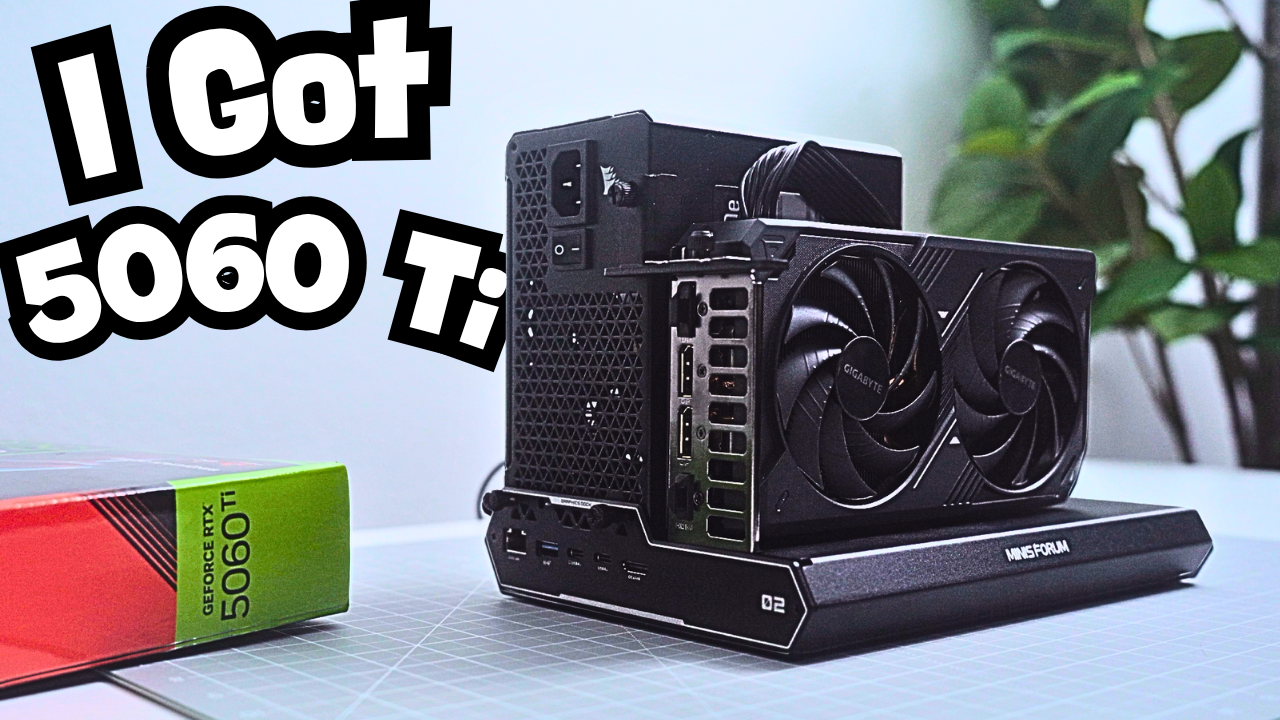
The part I keep coming back to is being able to leave my desk with the same computer I was just using on two monitors. That was the appeal of adding an RTX 5060 Ti to my Legion Go 2: better gaming and enough power to do my work, while still having a handheld I could take to the couch.
After about a month, I liked the idea just as much. The results were more complicated. Games ran better, and I finished editing an entire video on it. But Premiere Pro still kept this setup from becoming my official desktop.
Prefer to watch instead? I cover the setup, games, and editing experience in my video. Watch I Gave My Legion Go 2 a Desktop Graphics Card
The setup that made it possible
I connected the RTX 5060 Ti through a MINISFORUM external GPU dock, with a separate power supply mounted on the dock and both monitors plugged directly into the graphics card. One cable connects the dock to the Legion Go 2 and charges the handheld at the same time.
Getting it running was straightforward. After installing NVIDIA’s drivers, I checked Device Manager to confirm Windows recognized the card. The dock also gave me USB-A connections for a mouse and keyboard, plus an M.2 2280 SSD slot. I installed a 2TB SSD there for my video footage.
That combination made the Legion Go 2 much more useful at my desk. The question was whether the extra hardware would deliver enough of an improvement where I actually needed it.
Gaming made the strongest case
I’m usually happy when a game looks good and runs smoothly. I don’t need the highest possible frame rate, but I could feel the difference the RTX 5060 Ti made. For most of my gaming, I used 1440p, high settings, and DLSS when available, with the Legion Go 2 in Performance mode. Frame generation was off in the recorded comparisons.
Call of Duty: Modern Warfare 4 was in beta during my testing. With the RTX, I was mostly in the 70s and sometimes the 80s. Switching to internal graphics at the same 1440p high settings dropped the frame rate into the 40s. It was still playable, but I enjoyed multiplayer more with the external card.
Marvel Tōkon: Fighting Souls stayed locked at 60 FPS with the RTX and felt responsive. Internal graphics put it in the high 30s and 40s at the same settings, and it felt slower. Madden showed a similar benefit: mid-50s and 60s with the RTX, compared with a drop into the high 20s and low 30s during one kickoff return on internal graphics.
Those were observations from playing, rather than a controlled benchmark suite. I could lower settings on the internal GPU, but the external card let me enjoy the higher settings I wanted to use.
Crimson Desert challenged my expectations
Crimson Desert gave me the result I found most interesting. Instead of comparing the two GPUs, I walked through the same area at different resolutions with the RTX 5060 Ti.
At 1440p High, I was mostly in the mid-50s to low 60s. Moving up to 4K dropped the frame rate into the high 30s. That made sense to me. What surprised me was dropping to 1080p and getting roughly the same frame rates as 1440p.
For that section of the game, lowering the resolution didn’t buy me the improvement I expected. My testing didn’t establish the cause, so I can’t point to a specific bottleneck. It did give me a reason to temper my expectations about how much performance this particular setup could deliver.
Marvel Rivals raised a separate question. It played well with the RTX, but my overlay showed system RAM usage in the 90% range. After I reduced the UMA frame buffer from my usual 10GB to 4GB, the reading fell into the 80s. That memory reading alone doesn’t establish a frame-rate improvement; it was another detail that stood out while using the external GPU.
Premiere Pro was the real desktop test
Word and Canva already worked on the Legion Go 2 without a desktop graphics card. Video editing was where I needed the extra performance. During my earlier attempt with internal graphics, playback slowed down and Premiere sometimes froze. I eventually went back to my M4 Pro Mac mini to finish.
This time, I made sure Windows assigned Premiere Pro to the RTX 5060 Ti and selected the CUDA renderer in Premiere’s project settings. I still ran into occasional slowdowns, and I was a little more patient, but I finished editing the whole video on the Legion Go 2.
That mattered. I had gone from abandoning an edit to completing one. It also left me with two different questions: how much faster could it export, and was the editing experience comfortable enough to use every day?
What the export times actually showed
I exported an approximately nine-minute project at 3840 × 1920. For each run, I used Performance power and thermal modes, set the fan to full speed, cleared Premiere’s media cache, and removed remaining render files.
For this comparison, I worked from an external enclosure rather than the SSD in the dock. I tested exporting to that external storage and to the Legion Go 2’s desktop on internal storage, with each GPU configuration.
| Graphics | Export destination | Time (m:ss) |
| RTX 5060 Ti | External storage | 19:36 |
| Internal AMD | External storage | 21:31 |
| RTX 5060 Ti | Legion Go 2 desktop / internal storage | 15:41 |
| Internal AMD | Legion Go 2 desktop / internal storage | 17:21 |
The RTX reduced export time by 1:55 with external storage, a reduction of about 8.9% from the internal AMD result. Exporting to the Legion Go 2’s desktop saved 1:40 with the RTX, or about 9.6%. Helpful, but not a dramatic change.
The export destination also made a material difference in this setup. Exporting to internal storage cut 3:55 from the RTX run and 4:10 from the internal AMD run compared with external storage. I didn’t isolate why that happened, so these results don’t establish a cause or a general rule about storage.
The faster exports were welcome. They didn’t resolve the slowdowns I still noticed while editing, which mattered more to my decision about replacing my desktop.
Living with the setup
The dock is about 11.5 by 7 inches, and roughly 7 inches tall with my power supply installed. It takes up space without taking over my desk. I like seeing the graphics card in the open design; watching the fans is a little like having an expensive fidget spinner nearby. The exposed cables are less attractive, but swapping the card, power supply, or storage is easy.
Fan noise was harder to ignore. In Performance mode, I could hear the Legion Go 2 almost constantly, even with the fan set to Smart. It bothered me less during games, but while working I sometimes switched to Quiet mode. I also missed having an SD card slot on the dock. I needed a separate reader for my footage, and transfers seemed slow, though I couldn’t tell whether the reader was responsible.
Moving between the desk and handheld use remained my favorite part. In one experiment, I disconnected without shutting everything down first and Windows switched back to internal graphics without crashing. I wouldn’t recommend repeating that with storage attached. Reconnecting took about 20 seconds before everything was back, which was easy enough to live with.
Gotta keep it real about the cost
I paid $1,350 for my Legion Go 2 and about $450 for the RTX 5060 Ti from Micro Center. That is roughly $1,800 before adding the dock and power supply. Those are my purchase prices, not a current shopping quote.
I wouldn’t recommend buying this whole setup from scratch based on my experience. Once I add up the pieces, I’d want to compare the total with a gaming desktop or laptop and a less expensive handheld. The convenience is appealing, but it is an expensive way to get it.
My situation was different because I already owned the Legion Go 2. I liked the idea of giving it more power, and experimenting with hardware is part of the hobby for me. That explains why I enjoyed building this even though I wouldn’t tell everyone to go buy the same thing.
Why it still has a place on my desk
After a month, I could see the appeal every time I finished working, picked up the Legion Go 2, and went to play on the couch or at the kitchen counter. I could bring it back to the office and reconnect when I wanted the monitors and extra graphics power again.
The RTX 5060 Ti improved gaming and let me get most of my work done. Finishing a full video was progress, but Premiere’s editing performance still wasn’t enough to make this my official desktop. I enjoyed using it; I wasn’t ready to rely on it for all of my editing.
I’m still interested in trying a more powerful graphics card. For now, this setup gives the Legion Go 2 a more useful role at my desk, even though my regular desktop is staying.